Designing a dashboard in the age of AI: from a PM's messages to a designer's decisions
Not long ago I got a dashboard request from a PM that was just a few chat messages and one reference image. Once it was done, I realized the slowest part was not drawing the interface. It was deciding what to keep, what to drop and how to present the data. This post retells that exchange, with a few survey numbers to put it in the context of AI changing how designers work.
Interfaces come faster, decisions do not
Figma and NewtonX surveyed 906 digital designers. The results: 89% say they work faster, 80% say they collaborate better and 91% say the new AI tools improve their designs [1]. These are self-reported numbers, not an independent measure of output quality.
I read it this way: the speed of producing options has clearly gone up. But a good-looking dashboard does not automatically help people read numbers faster or decide better. Figma’s 2026 AI report also found that 90% of respondents say design matters at least as much as before AI, and nearly six in ten say it matters more [2]. That is the view of the surveyed group and should not be taken as a conclusion for the whole industry.
The faster options arrive, the more choosing between them matters.
Case study: from a few PM messages to a dashboard
The brief came from the PM over chat. First a list of client types (individual, legal_entity, individual_with_business_activity) and nine product names, then a list of which product belongs to which client type. Product names and numbers in this post have been replaced with fake data.
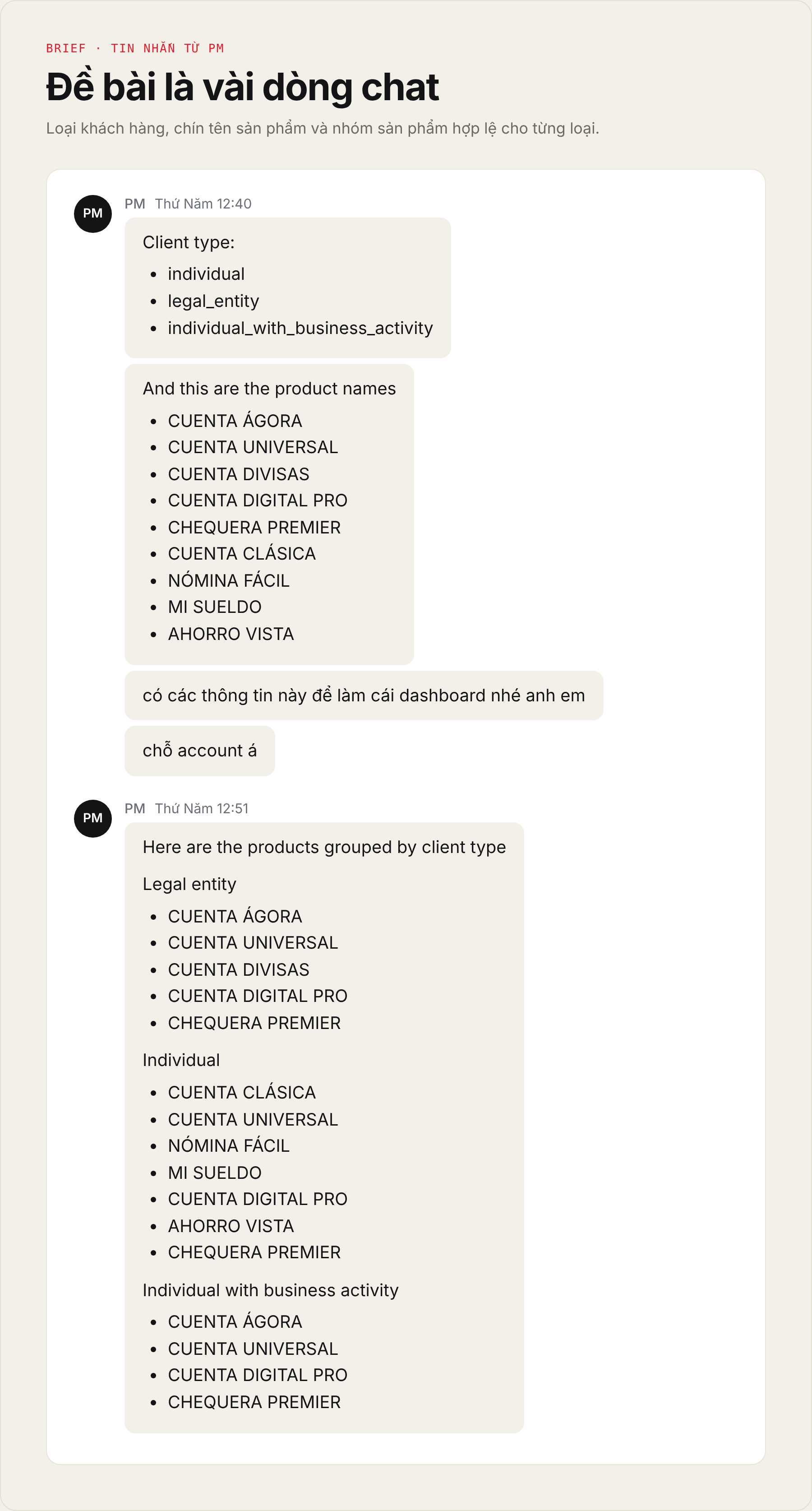
I read this as a business rule rather than a list. Some products are for one client type only, some work for all three. That decides which cells in the final table are valid.
A reference image and a short question
A few hours later, the PM sent a reference dashboard with one line: “xem cái nào xài đc anh em” (roughly: see which of these we can use). There was no feature description, just the big picture: account-opening trend by day, share by client type, ranking by product, a product by client type matrix and a list of recently opened accounts.
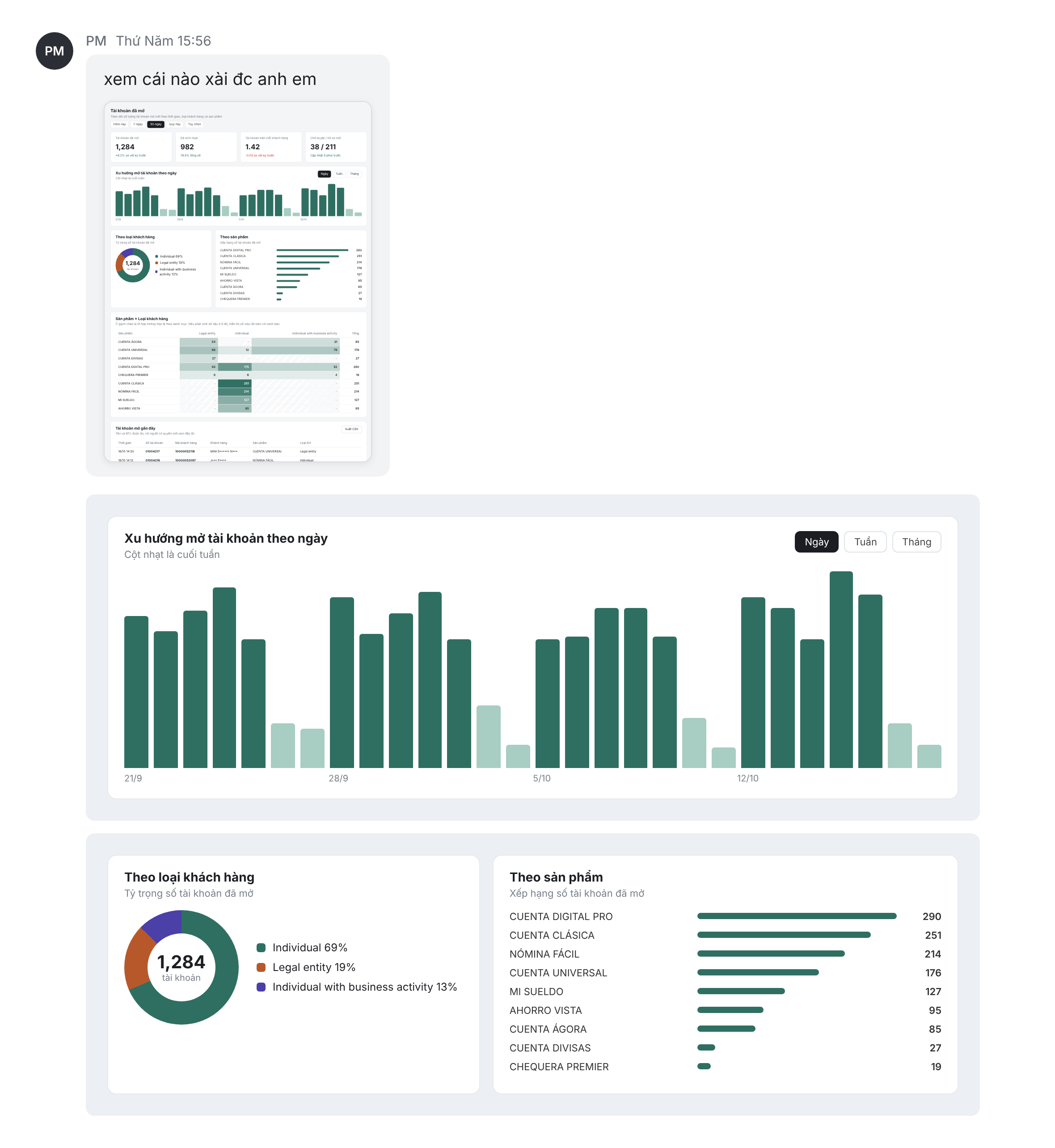
The real question is which question each module answers for the viewer. The bar chart shows change over time. The donut and ranking bars show share. The table shows exact numbers. Before choosing, I asked myself: does the user need to know how many new accounts opened today, or to cross-check each product against each client type?
When the PM suggests another module
Then the PM added: “thêm 1 module xem cái này cũng hay” (add one more module, this one looks good too), with the product by client type table and the recently opened accounts table.
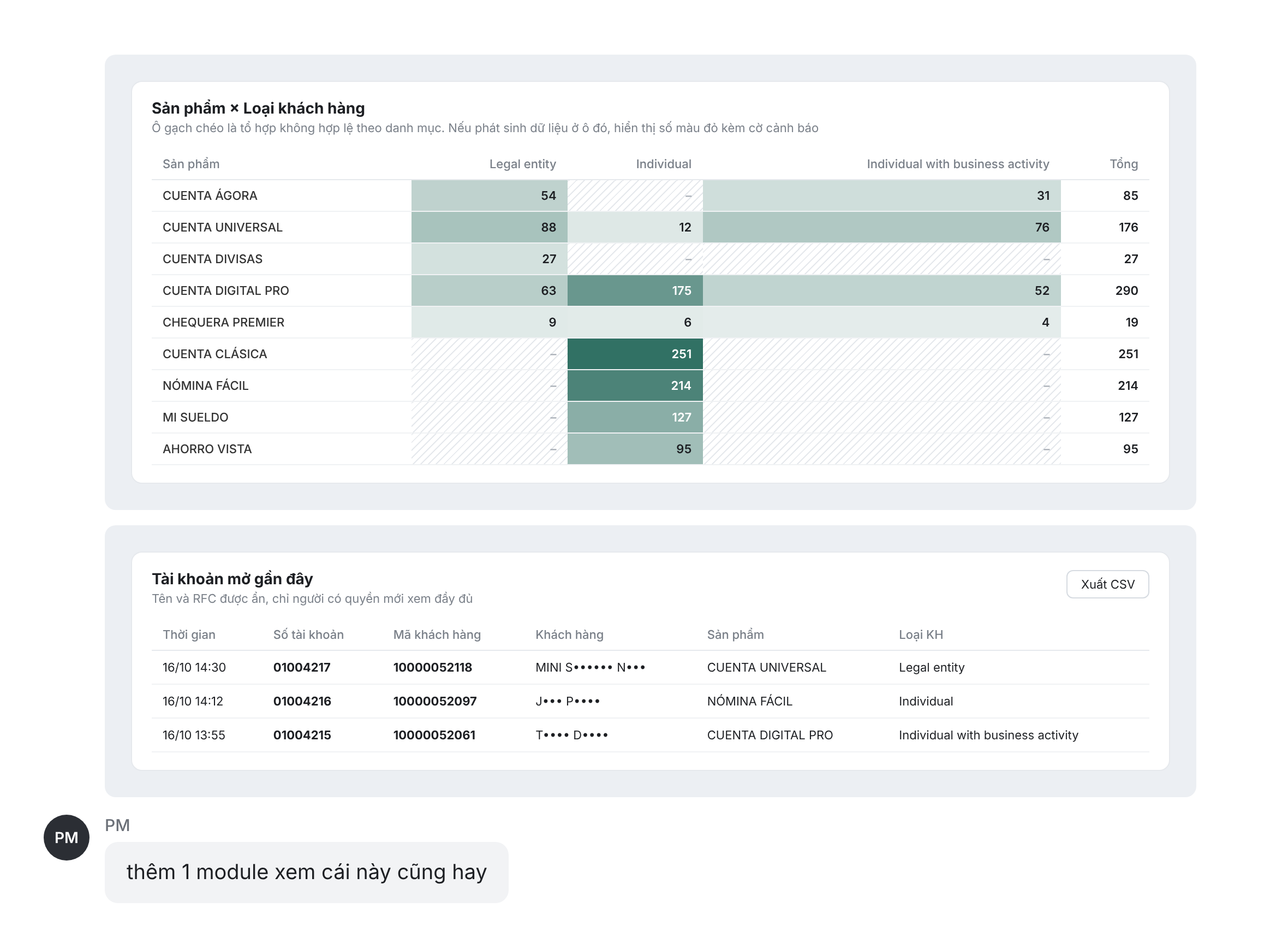
This table reads fast thanks to color: the darker the cell, the larger the number. Two details caught my eye. First, the hatched cells in the reference mark invalid combinations, which matches the product groups the PM sent at the start. Second, because account data includes customer names, the reference masks some characters and only authorized people can see them in full.
The final interface
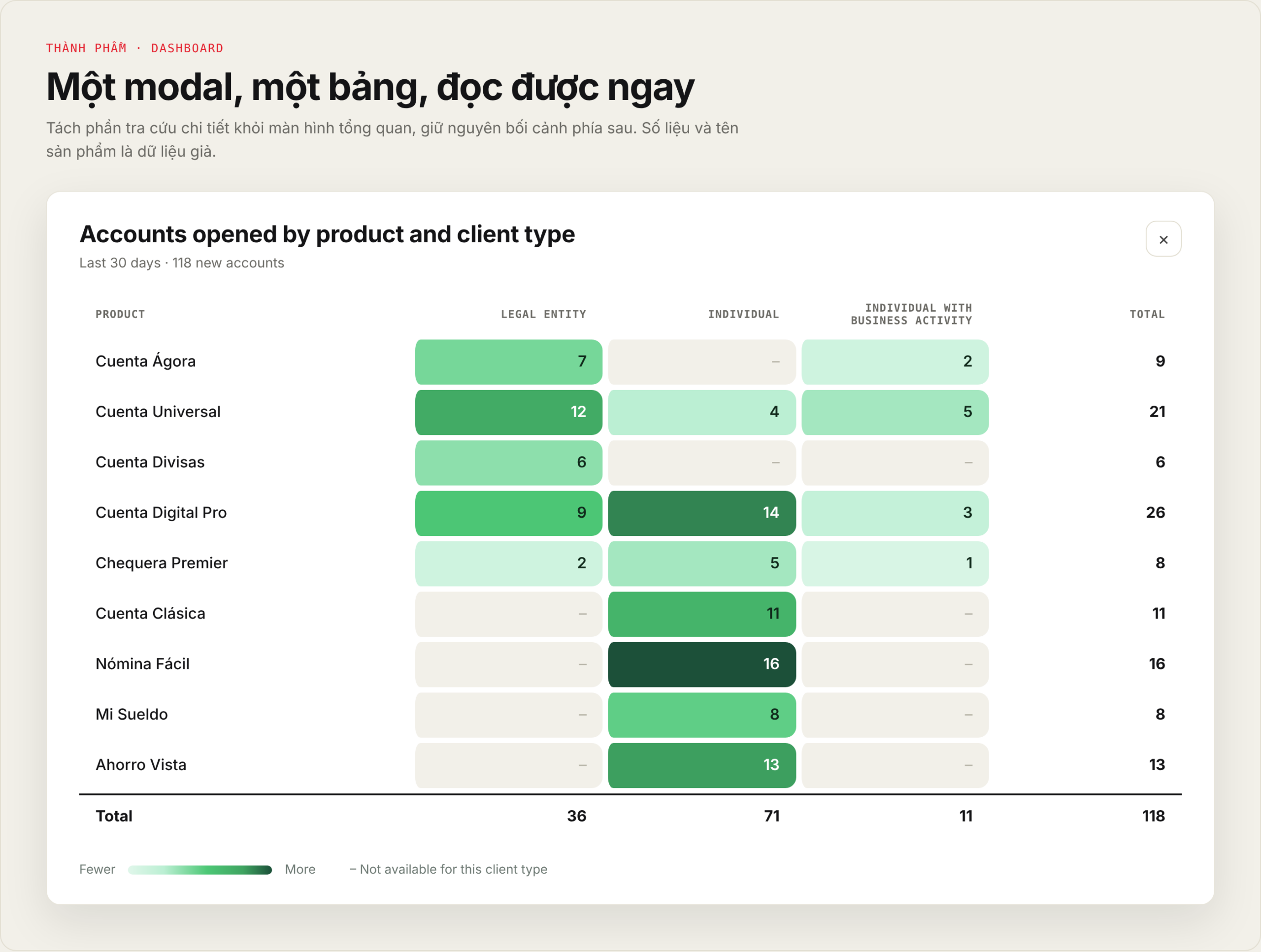
I built the final version as a modal opened from the overview dashboard, titled “Accounts opened by product and client type”. The reason is to separate detailed lookup from the overview screen while keeping the context visible behind it.
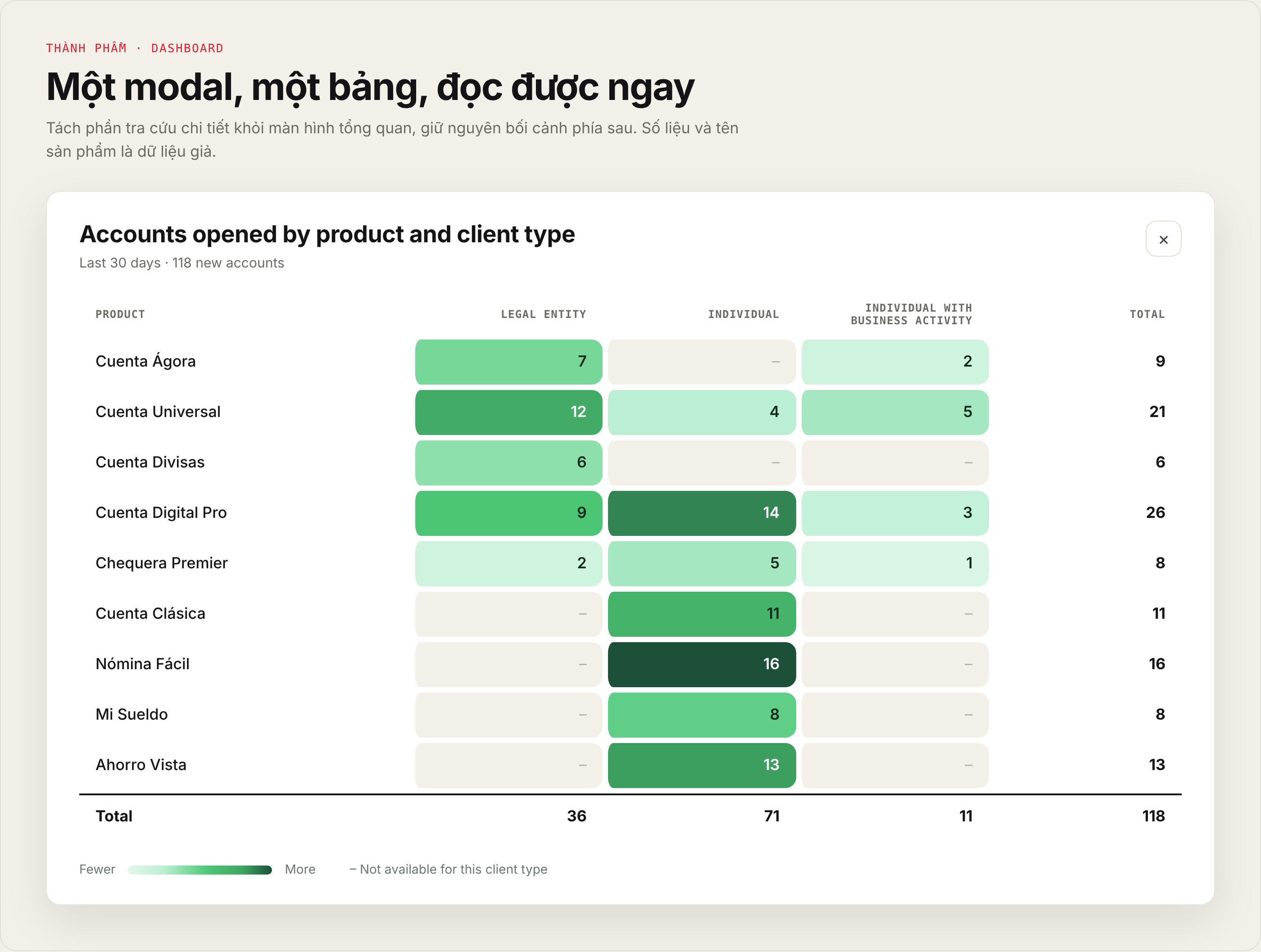
A few decisions I kept:
- Keep the row and column structure so each product can be compared precisely with each client type.
- Color by intensity but still show the number, so color is only a supporting channel and not the only way to read the data.
- Put the row and column totals inside the table so people do not have to add them up.
- Mark invalid cells with a dash instead of 0, because “none” and “not possible” are two different things.
A modal has trade-offs too. Many rows mean scrolling inside the modal, and I still have to check the contrast of the color scale so the numbers read clearly on both dark and light cells.
Where AI sits in the process
I picture the process in four steps: PM brief, exploring options, design judgment, final interface. AI can help in the exploring step by producing more directions faster. But every direction has to pass a few questions: is it consistent with the design system, does it overload the user, does it match the business logic, can it scale?
Amershi and colleagues at Microsoft Research (2019) proposed 18 guidelines for human-AI interaction [3]. That work is about designing systems that include AI, not about measuring productivity when AI is used to design interfaces, so I only borrow its spirit: users need to understand a system’s limits and have a way to correct its results.
Skills worth investing in
For data-heavy products, I think these four are worth the most:
- Information architecture: grouping and prioritizing information, especially when a dashboard is dense with data.
- Design judgment: judging options by usage goals and constraints, not only by looks.
- Design system: making sure a new option fits the existing components and interaction conventions.
- Data visualization: knowing when to use a table, a chart or a heatmap, and the limits of encoding with color.
Figma’s AI report also notes that the share of designers taking part in product development rose from 21% to 41% [2]. The line between roles is moving, but that does not mean every designer has to become a developer.
Conclusion
AI shortens the road from idea to prototype. But what to choose, what to drop and why is still the designer’s job.
If you are working on a dashboard or a data-heavy product and want to chat, just message me through the contact section!